Content Management

Judging Five Open Source Content Management Systems

Last fall, I once again had the privilege of participating as a member of the judging panel for Packt Publishing's Open Source Awards. For the 2010 event, I participated by voting for the category of Open Source CMS Awards. In that award, the winner was declared by the panel to be CMS Made Simple, with SilverStripe as first runner up followed by MODx as second runner up.

I received a lot of inquiries asking me how and in what order did I rank the content management systems. Each of the judges on the panel, selects and ranks their top three CMS from the five included in this category. The judges are given a lot of reign for how they rank the CMS and may consider a number of factors including performance, usability, size and support from community, accessibility, ease of configuration, customization, scalability and security.

It has been my history to be transparent to all with how I rank each CMS as my vote will have some differences to those of the panel. This time around, I find myself hesitant and under personal protest with me providing information on how I ranked the five content management systems.

I question whether we're doing any good by declaring one CMS as better than another CMS. Dean Barker discussed on his blog some time ago this same uneasy feeling you get when you judge a CMS without having some reference to real world requirements. None of these content management systems would I consider losers and all of them remain worthy of future consideration. Yet, I'm disturbed that people will look at the numbers and interpret the results in a ways I never intended my rankings to be used.

My rankings for the Five Best Open Source CMS (with number one being the highest) were:

  1. SilverStripe
  2. mojoPortal
  3. MODx
  4. XOOPS and CMS Made Simple (Tie)

I'm not a firm believer in ties when it comes to ranking content management systems. Yet, this year I did just that for XOOPS and CMS Made Simple. All five content management systems that were reviewed I would consider as a candidate for a future project. None of the CMS would I consider a "last place" CMS so I refused to do so. It is also important to note that neither Drupal, Joomla!, or WordPress competed in this ranking as previous winners in this category duke it out in the Hall of Fame category.


Mailbag: An introduction to ProcessWire

While I try to do my best to cover some of the big names in content management systems, I think the best part about CMS Report is it has introduced to both you and me web applications that are just starting to become known to the CMS world.

Ryan Cramer recently introduced me to a relatively new CMS called ProcessWire. Ryan is so passionate about this CMS that he would like to now grow both the user base and the open source community behind ProcessWire. In Ryan's own words:

I'm a regular reader of your Twitter feed (which I enjoy a lot, so thanks for doing it).

I've been designing and developing CMSs for about 10 years now, and specialize in large scale content management solutions for several companies throughout the US. I recently released an open source CMF/CMS project called ProcessWire.  As a user of multiple CMS platforms, I built this tool to be one that fills my own needs where other products don't, and I think it's fairly unique in several aspects (especially with regard to the API).

I'd like to grow the user base with the goal of getting more people involved in the project itself. Now that we've gone past the developer preview stage, I'm starting to look at how to get the word out...

Thanks,
Ryan

ProcessWire 2.0 is very similar in look and function to Dictator CMS (2003) and ProcessWire 1.0 (2007), both of which are still in use on many sites today. Despite intentions to do so, neither product was ever released open source, except for the projects the author used it with. ProcessWire 2.0 is the first GNU/GPL licensed version, and it is architecturally stronger than the CMSs that preceded it.

A number of  sites have already been developed with ProcessWire including such sites such as Lost River Winery, TripSite.com, Island Hideaways. Honestly, I was impressed with the design quality and functionality of the sites developed with ProcessWire.

All in all, if you're bored with your current CMS or looking for something different I think you should look at this most promising CMS, ProcessWire.

Telerik Unveils Powerful Sitefinity 4.0 Content Management Solution

Recent Mallsoft acquisition lays foundation for advanced Sitefinity e-commerce functionality

WALTHAM, MA, JANUARY 17, 2011 –Telerik, an end-to-end provider of software application lifecycle and content management solutions today announced the launch of Sitefinity 4.0, the newest edition of its powerful, scalable Content Management System (CMS). The platform’s redesigned product architecture delivers an array of enhancements, like advanced workflow control for better business process management and improved ease-of-use, generating considerable productivity gains of up to 70 percent. Underscoring its commitment to meeting the needs of customers developing commercial websites, Telerik also announced its recent acquisition of Mallsoft, leading developers of e-commerce shopping cart technologies. The acquisition lays the groundwork for the integration of advanced e-commerce functionalityand a robust system for handling online stores within the Sitefinity platform.

“This is the culmination of many years of real-world experience, extensive time and resources invested in product R&D, and in gathering customer feedback. Additionally, with new frameworks supporting Mallsoft’s e-commerce technologies, users have the ability to fully manage all aspects of their online business, from corporate websites to intranets to online stores. Sitefinity 4.0 has matured into one of the market’s most powerful, comprehensive, and highest quality content management solutions being shipped today,” said Martin Kirov, executive vice president of Sitefinity atTelerik. “By minimizing complexities while providing robust tools and innovative features addressing every aspect of the site building and management experience, Sitefinity 4.0 enables users to quickly, easily, and efficiently optimize their web presence.”

Intersoft Solutions Releases WebUI Studio 2010 R2

Intersoft Solutions today announced the official release of WebUI Studio® 2010 R2, the world’s most advanced presentation layer toolset for ASP.NET, Silverlight and WPF application development. Featuring over 60 new rich controls for Silverlight and WPF platform, and dozens of new business-inspiring samples, developers can now rapidly build cross-platform applications with the next-generation user experiences, while at the same time leveraging the best practice in architectural design pattern.

With the new R2 release, WebUI Studio® delivers a total of 280 high quality UI components for ASP.NET, Silverlight and WPF development, setting its position as the world’s most comprehensive user interface library suite available today.

Drupal 7 has been officially released

After three years of open source development, Drupal 7 has finally been released to the public. As Ric Shreves previously mentioned in his article, there are literally hundreds of changes in Drupal 7. I've included below a list of the more significant changes from Drupal 6 to Drupal 7. I've also included a nice Drupal 7 marketing video via Jeff Robbins at the bottom of this post. Also there is always official Drupal 7 announcement for additional information on this latest version of Drupal.

Get started with Drupal 7Barring any unforseen changes to how I manage this site, I expect we will be upgrading CMSReport.com from Drupal 6 to Drupal 7 within the next few months. I've been playing with Drupal 7 off and on this past year, but I must confess I haven't been as aggressive in my testing of this version of Drupal as I was with Drupal 6.

Some of the more significant changes in Drupal 7 since the release of Drupal 6 include:

1. Overhaul of the User Interface

Work has been done to improve the user experience and administration interface. The new administration theme "Seven", the overlay module, the dashboard and the configurable shortcut bar, all lead to a much more user-friendly interface.

2. Custom Fields

Drupal 7 bundles in the ability to add custom fields, similar in functionality to the Content Construction Kit (CCK) module. However, fields are no longer limited only to content types; they can be added to users, taxonomy terms, and other entities. Fields also have support for translations.

3. Image Handling

Drupal 7 brings native image handling to core. Image fields may be added to content, and have image styles applied to them, such as scaling, cropping, and other effects.

A First Look and Review of Drupal 7

Editor's Note: The following aritlce is authored by Ric Shreves and first appeared online at  Open Source CMS Pro. Permission has been granted to repost the article here at CMSReport.com.

Now that Drupal 7 has gone through a couple of Release Candidates, we feel confident that what we can see on the screen today represents very closely what everyone can expect in the final Drupal 7 production release. So, with some certainty at our backs and the release date just around the corner (we hope!), we thought it was time for us to present a Drupal 7 “first look,” that is, an overview of what everyone can expect from the new Drupal 7.

There are literally hundreds of changes in Drupal 7. Many of those changes are “minor” in the eyes of most users, indeed, they are essentially invisible. This doesn’t mean those small changes aren’t important, simply that they aren’t on the radar for the average user. In this article we are going to focus on just the highlights, in three key areas:

  • Changes visible on the surface
  • Extensions of the Admin functionality
  • Enhancements to the technical infrastructure

On the Surface

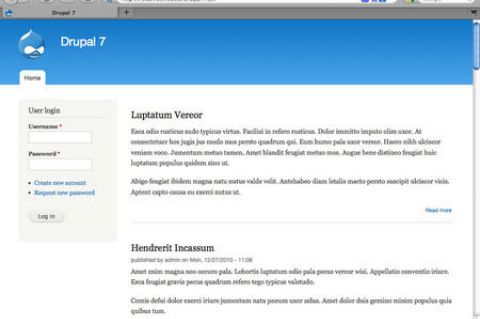
The first thing you notice when you fire up Drupal 7 is a new look and feel. For the first time in years, the release includes new themes. The only holdover from previous releases is the Garland theme, which has been updated to be Drupal 7 compatible. The new themes include:

  • Bartik: The new default theme. Shown in the screenshot on the left.
  • Seven: The new admin theme, seen in several of the screenshots, below.
  • Stark: A new starter theme, intended for jumpstarting theme creation efforts via sub-themes.

Of the four themes (three new ones + Garland), only Garland and Bartik are ready to use on the front end of the site. Stark is purely a base theme, barren of all styling excepting only the default system styles. Garland remains, well, Garland; it's basic and offers not a lot. Bartik is a big improvement with more than a dozen regions (module positions) available. Still, visually, Garland and Bartik are not worlds apart. Some additional variety would have been nice. (We note that the theme Corolla, which was included in earlier Drupal 7 beta releases did not make the final cut, sadly.)

The inclusion of a base theme (Stark) is a nice move -- giving themers who don't want to use Zen (or other external starter themes) an easy way to build their own themes via sub-theme creation. One of the most welcome changes in Drupal 7 is the revision of the administration interface. This is not a minor tweak – this is a complete revision of both the interface and the information architecture. Long overdue, I think we all can agree…

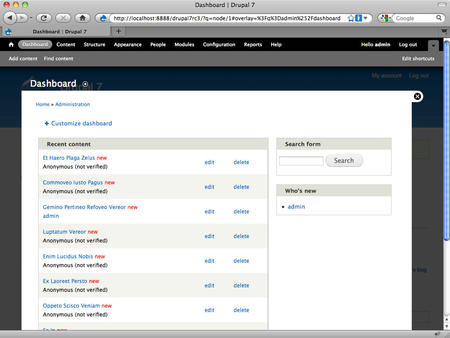
The new look of the Drupal 7 admin system The new admin interface includes not only its own dedicated theme (Seven), but also a new overlay, toolbar and shortcuts menu, as shown in the screenshot, at right. The overlay gives you a light box approach to the admin layer, preserving in the background the front-end theme. Having a dedicated theme for the admin system is a huge improvement in usability for the system and that alone would be reason to celebrate, but changes don’t stop there.

The new toolbar is anchored to the top of the browser window, reminiscent of the popular Admin Menu module many of us used in the past. There is also a configurable shortcuts menu present on the bottom edge of the toolbar; you can add your own favorites to the shortcut menu. A related improvement in look and feel is the inclusion of the Vertical Tabs functionality in the core. The functionality improves usability and reduces admin system clutter.

The Drupal team has also taken a fresh look at the admin system’s labels and information architecture. They’ve cleaned things up, eliminated redundancies and clarified labels. All in all, the admin system changes finally bring Drupal into a state of usability that will make the system much more accessible for many non-technical users.

The final area I want to highlight is a set of minor changes that will be meaningful to old Drupal users. Drupal 7 has “cleaned house” and done away from some of the legacy features that, frankly, weren’t of much utility. Gone in Drupal 7 are the Mission Statement functionality and the Footer Message. The site Search is now simply a block, instead of having two different versions of the same functionality. Also gone is the Theme Switcher option for users. Again, changes that clean things up, reduce complexity, and improve usability of the system as a whole.

CMS Report's Top Ten Content Management Stories of 2010

What a great year 2010 was for content management. Open source CMS projects seemed to have grown up this year while proprietary systems appeared to continue in their evolution. While social publishing systems may not have conquered the traditional content management system, the CMS definitely took notice by integrating as many social media features developers could come up with.

Below are the top ten stories of 2010 that were posted here at CMSReport.com. The stories in this list were ranked by the number of views per month since the articles first appeared at CMS Report. 

Top Ten Content Management Stories of 2010

  1. Someone does another Drupal vs Joomla comparison
  2. Open Source versus the Enterprise Solution
  3. Ten Content Migration Tools to SharePoint Platform
  4. Drupal themes go nuclear with Fusion
  5. SilverStripe CMS becomes the first Microsoft Certified open source web app
  6. Denial of Service on an Apache server
  7. Guidelight Business Solutions video of DrupalConSF 2010
  8. Sharepoint 2010 vs WCM Platforms
  9. We Hear You: Our spam filtering needs to be improved
  10. The MODx Revolution 2.0 Interviev

As you can see, stories on Drupal, Joomla!, Sharepoint, SilverStripe, and MODx brought a lot of visitors to the site. Not all the stories listed above would have been one of the ten I would have personally picked, but I'll respect the numbers behind their ranking. I personally, don't like "versus" articles yet readers seemed to flock those articles. Unfortunately quality of writing doesn't appear to always matter as there were some very well written articles we posted in 2010 that didn't make this list.

The year 2011 will undoubtedly bring change and new stories to the world of content management systems. I think the year will also be a year of decision for the direction we take CMSReport.com. I feel as if this site of ours is stuck somewhere between our roots as a niche blog and a potentially popular CMS news site. I'm hoping we make some changes in the new year that all our readers can appreciate and value.

10 Rules to Ensure Steady Progress on Your BPM Project

In his well-known book “All I Really Need to Know I Learned in Kindergarten,” which is regarded for its timeless insights, Robert Fulghum reviewed some basic lessons of life we all learned as children that are universally true, even at the places where we work and within our social interactions. There’s a reason we invest a good portion of our educational funds in early learning: what we absorb and come to believe during our formative years influences our thoughts and decisions throughout our lives.

If you haven’t thought about each of the ten timeless truths listed below in terms of your business process automation goals, it may be time to rethink your ECM strategy. The payoff for ‘getting it right the first time’ is significant.

Here they are, rephrased a bit to help you make the connection:

  1. Remember that everything dies. Hamsters, mice, people, and even company projects have limited life spans. Routine business processes, too, ultimately outgrow or outlive their usefulness. Take time to put everything in perspective. What are your company goals? Are your processes still relevant and in line with your vision? Are there processes you maintain purely because things have ‘always’ been done a certain way? Is anything ripe for change?
     
  2. Be prepared. Remember the first day of kindergarten? Probably not, but chances are good that you carried a backpack or bag with everything you needed to address the routine challenges of the day. If you’re investing in technology, give yourself and your staff the time and resources they need to be prepared. You can’t expect miracles from even the best software and hardware. However, if you give your people sufficient time for analysis, planning, and improvement, ECM technology can produce phenomenal results.
     
  3. Play fair. Be considerate. Even if you’re starting with a small project, keep the company’s enterprise goals and other departments’ needs in mind. Although you need to remain dedicated to your own vision, being selfish about your needs, simply refusing to make your project transparent, insisting on your own way of doing things, and similar self-centered practices will hurt your company in the long run. You’ll also miss great ideas for improvement that others could offer. You may have terrific ideas and plans, but someone else’s contributions might help them to prosper more fully.

Security Release: ImpressCMS 1.2.4

Two security vulnerabilities were just discovered and a new release has been published to address them. The ImpressCMS Project has just released ImpressCMS 1.2.4 as a stable release - site administrators are strongly encouraged to upgrade their sites.

The imagemanager plugin used by the TinyMCE wysiwyg editor was bypassing the permissions system, allowing unauthorized creation of categories and folders within the image folder. The second vulnerability was a potential cross-site scripting, but required elevated permissions and access to the administration area of ImpressCMS.