Content Management

JFBConnect v3.2 - Adds Multiple Features for Enhanced Integration of Joomla and Facebook

With Facebook recently announcing it surpassed the 500 million user mark, and Joomla powering over 2.5% of all websites, the integration of both is a natural fit for growing your site and brand both easily and organically.

The newest release of JFBConnect, version 3.2, now makes that integration even more powerful! Updated features include a rich wall posting feature on registration and login, full Facebook Open Graph support, automatic comments and like boxes throughout your Joomla site, and additional profile fields during registration.

These enhancements are all in addition to existing features such as one-click registration, customizable profile import into multiple 3rd party extensions, automatic logging in of Facebook users, and all of the Facebook social widgets such as Like, Comments, Fanbox and more.

Rich Wall Posts

With rich wall posts during registration or login, you're sure to get noticed by Facebook users! Simply fill out the message, image, and link to post when any user registers or logs in and JFBConnect takes care of the rest.

Open Graph Support

Interactive Multiligual: Crowdsourcing translations with Tiki

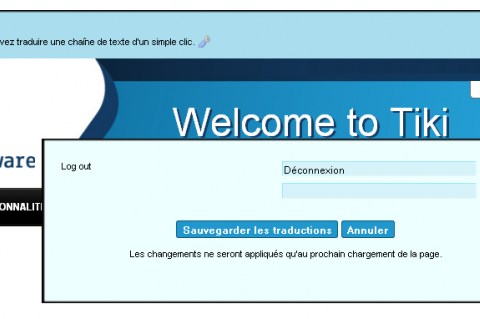
Many times, software internationalization (often abbreviated as i18n) and translation can quickly become a nightmare... if you don't have the right tools. Tiki's interactive translation feature allows contributors to create, edit, and maintain the more than 40 translations of Tiki Wiki CMS Groupware.

In true "dog-fooding" tradition, the Tiki Community began crowd-sourcing this feature in 2010 by establishing a dedicated Tiki instance for translators. Not only can contributors translate via their browser, but Tiki's interactive translation feature allows textual translations within context. The centralized translation server, running the latest Tiki code, ensures that all translators are using the same version. The translation strings are regularly committed to the Tiki SVN repository.

Due to its ease of use, the Tiki Community recently completed two translation sprints, pushing the German and French languages towards 100% completion. With more than 45 active translator accounts, other languages are not far behind.

List of Fake Content Management Stories from April Fools Day 2011

For the blogger, the most difficult day of the year has to be April Fools' Day. This is the day where jokes are played and stories are made  up. Computer geeks and CMS junkies easily get into the spirit of this celebrated day by pulling all kinds of online pranks. One of my fondest April Fools memories is from 2007 when the official Japanese and Russian Drupal sites migrated for a day from the Drupal CMS over to Joomla!. Good times, good times. The folks over at ocProducts have gotten into the 2011 April Fools spirit by announcing ocPortal 7 with HTML6.

I need your help! Please help me keep track of all the CMS related April Fools' stories that you find online.  Please feel free to add to my list by of content management pranks via a comment below or through Twitter. If you prefer to tweet the story instead I suggest we start using the Twitter hashtag: #aprilfoolscms.

List of Fake Content Management Stories on April Fools Day 2011

  1. ocPortal - ocProducts announces ocPortal 7 with HTML6
  2. Drupal - Announcing CertifiedToSUCK.com
  3. TYPO3 - New paradigm for TYPO3 4.6 development
  4. Drupal - Announcing the Drupal Retail Store
  5. Joomla - Joomla Templates from YOOtheme
  6. Real Story Group  - No more content management
  7. Sharpened.net - The End of the Keyboard and Mouse
  8. IBM developerWorks - Scrum Alliance 2.0
  9. CMS Made Simple - Intuit Announces Acquisition of CMS Made Simple
  10. Enano - Enano merges with Joomla!
  11. EpiServer - EPiFAX 1.0 Released
  12. Plone - Plone Announces New Release Naming Scheme Effective April 1

dotCMS Releases 1.9.2

Miami, Florida (March 29, 2011) —  dotCMS has made 1.9.2 available to the community and general marketplace.  This is the second major release of new features and improvements since dotCMS rolled out the 1.9 series back in July of 2010 and features a number of improvements geared toward performance, scalability and ease of use.

“1.9.2 represents a leap forward for dotCMS.  We and our global network of partners have established a solid pace in rolling out features and community plugins,” commented Will Ezell, CTO of dotCMS. “We are seeing the 1.9 series take a strong hold in the marketplace and the changes in 1.9.2 speaks to dotCMS’ continued focus on the meeting the needs of both the enterprise and of their end user.”

1.9.2 has also been benchmarked on both cloud and physical servers and shown to scale extremely well horizontally and vertically – serving over 4,600 transactions a second across a variety of page types.  The complete performance report can be found here.

New Features Include:

  • Online Image Editor allows content contributors to edit images without needing additional software.  Users can resize, crop, rotate, "save as" different image types and adjust hue, saturation, brightness and coloration of images stored in dotCMS.
  • New Image Renditions and Clipboard allows content editors to use edited versions (renditions) of source images without having to store multiple versions of the same image.  An Image clipboard allows users to create the rendition they want to use, add it to their clipboard, and paste it into their content for re-use.
  • Inline Editing allows content editors frictionless editing of site content, inline, without needing to return to the admin portal.

Alkacon Software launches OpenCms 7.5.4

Version 7.5.4 of OpenCms is now ready and available for download.

Alkacon and OpenCms logo

OpenCms is one of the most popular Open Source Content Management Solutions.

This new version was developed by Alkacon Software GmbH with the support of the international OpenCms developer community.

OpenCms 7.5.4 is a maintenance release that fixes a number of issues that persisted in the 7.5.3 version. Some new features have been added as well.

Main fixed issues and improvements in OpenCms 7.5.4

  • Fixed issue 1717: DB deadlock if OpenCms hits db.pool.default.maxActive when db.pool.default.whenExhaustedAction=block
  • Fixed issue 1900: Performance Patch for OpenCms
  • Fixed issue 1901: Workplace login page security issue
  • Fixed issue 1909: Internet Explorer crashes after saving structured XML content with image added from gallery into HTML field
  • Fixed issue 1942: Publish scheduled jobs are missing after server restart
  • Fixed issue 1945: Avoid reflected XSS on some authenticated resources (provided by Michele Orru)
  • Fixed issue 1949: Database size does not decrease after (completely) deleting resources
  • Fixed issue when creating a new user or editing an existing user using an Oracle database
  • Fixed issue using delete and lock resource when called without path parameter
  • Fixed issue in galleries: Broken layout with long item file names or titles
  • Fixed premature publish thread interruption within CmsShell
  • FCKEditor compatible with Internet Explorer 9 and Firefox 4
  • Added new optional CmsShell start parameter to load additional commands

 Please check out the release notes for further details of the changes in this release.

Magnolia CMS Helps $7B Utility Build its Brand on the Web

New case study details how SWM employed Magnolia’s STK to connect with customers and slash administrative costs

NEW YORK, NY — March 23, 2011 —  Magnolia, the open source content management vendor that delivers simplicity on an enterprise scale, today announced publication of a major case study detailing how Magnolia CMS helped Munich-based utility SWM upgrade its web image to engage with customers and promote environmental goals of green energy and sustainability.

TikiFest Boston Report

The Tiki Community recently completed TikiFest Boston, the seventh code sprint in Boston. More than 20 community met to plan, discuss, and demonstrate Tiki Wiki CMS Groupware. Many of the new features included in Tiki 7 were demonstrated, including:

  • Unified Search (based on Lucene)
  • Tiki-powered web sites on mobile devices, using jQuery Mobile
  • theme generator

Extensive work began on the revamp of Tiki Trackers -- a Tiki feature that allows users to create interactive forms and searchable datasets. Tiki 7 will include reorganized and streamlined code, allowing for easier enhancements in the future. Several TikiFesters also participated in a documentation sprint, in an effort to make the Tiki Docs more user-friendly and "catch up" to the current development.

The TikiFesters also joined the Boston jQuery Meet-up group. The event, "Tiki Wiki CMS Groupware and jQuery: the story of a successful integration," featured talks by Nelson Ko and Jonny Bradley. Ko and Bradley provided an overview of Tiki to the group and explained (and demoed) the jQuery integration that will be available in Tiki 7.

Finding the right hosting for Bitrix: rocks beneath the surface

You have just completed all the website development work and are ready to take it online. You started to search for a hosting plan that will suit your website and budget. You know the system requirements for Bitrix websites are: Apache 2, MySQL 5, PHP 5 etc. And you see that there a lot hosting plan that meet these requirements. But is it enough to check the system requirements only?

The real answer is – “no”.

Here are several things you should care about:

Main system requirements

Sure, your hosting tariff should meet all the system requirements.

This means that Apache, PHP and MySQL should be installed on the server in appropriate versions.

Sometimes the PHP version can be changed directly in server settings. You need to use either the hosting control panel or edit the .htaccess file. This can be tricky but you can always check it and fix it before the installation.

Specific server settings

  • Be sure that you have safe_mode turned off.
  • Safe mode may interfere with file and image uploads.
  • You need to check the open_basedir settings in your php.ini file and disable it.

New ocPortal 6 includes many new features and improvements

Open source ocPortal 6, a Web content management system, was recently made available to the public. ocPortal 6 is a major new version that incorporates many improvements and improves ocPortal's usability. Despite the significant changes in ocPortal 6, compatibility is expected to remain high with previous versions. The developers of ocPortal strongly advise upgrading to this version of ocPortal due to the significant performance and stability improvements.

Some of the new features and improvements in ocPortal 6 include:

Usability:

  • Install profiles built into the Setup Wizard now allow you to set up a new site really easily. Choose from: blog, community site, info site, portfolio and shopping site.
  • A smaller core. Many former 'core' addons are no longer core, meaning you can strip back and simplify your ocPortal site more than ever (don't worry though, they are still bundled and there by default, nothing is removed). Simplifying ocPortal for new users and small sites is a critical part of our strategy to increase ocPortal adoption.
  • A new Add Comcode Tag button has been placed on forms, which allows you to fill in a simple form to add any Comcode tag rather than typing it by-hand. This brings into the open a lot of very rich functionality that existed in ocPortal that many users won't have realised was there (for example, carousels, or tab navigation).